
If you’ve ever pointed a camera at LED lighting and seen banding, strobing, or an ugly flicker that wasn’t visible to your eye — you’ve run into a PWM problem. It’s one of the most common and most misunderstood issues in TV studio LED lighting and on-camera pixel LED installations. This guide explains what’s actually happening, why it matters for professional work, and how to choose hardware that won’t embarrass you on set.
What’s the Difference Between Refresh Rate and PWM Rate? #
These two terms get mixed up constantly, and they’re not the same thing. Refresh rate and PWM rate live at different points in the signal chain, and confusing them leads to buying the wrong hardware.
Refresh rate is how fast your pixel LED controller can push a new frame of color data to every pixel in the installation. It’s measured in frames per second (FPS). A controller with a 60 FPS refresh rate updates every pixel 60 times per second. This number is determined by your controller’s processor speed, the efficiency of the SPI protocol being used, and how many pixels are in the chain. The LED Strip Studio LEC3, for example, pushes several hundred FPS — far more than enough for any camera.
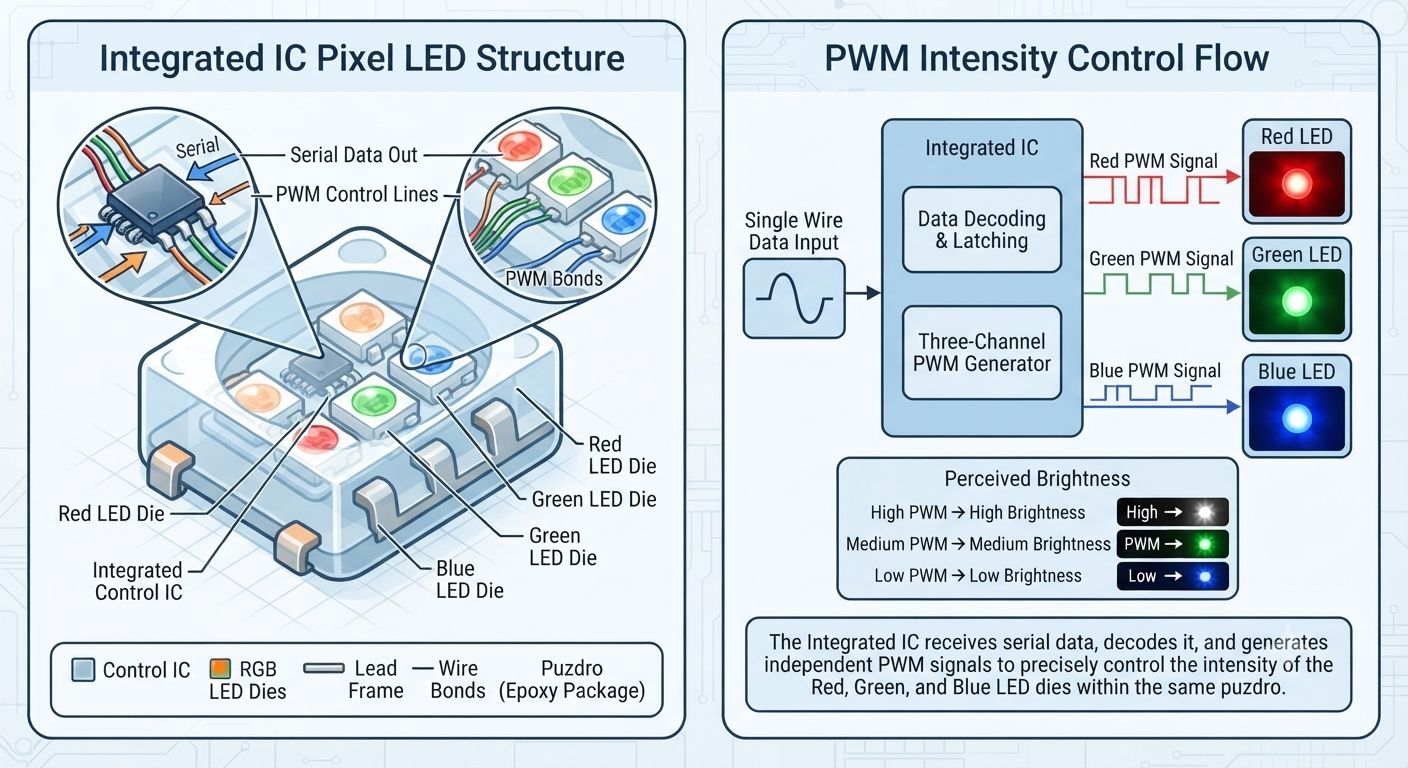
PWM rate is completely separate. It’s a fixed frequency built into the IC chip itself, and it controls how the LED dims. You can’t change it by adjusting your software or your controller. Once you’ve selected a strip with a particular IC — WS2812B, SK6812, APA102, SK9822 — you’re locked into that chip’s PWM frequency for the life of the product.
How Does PWM Actually Dim an LED? #
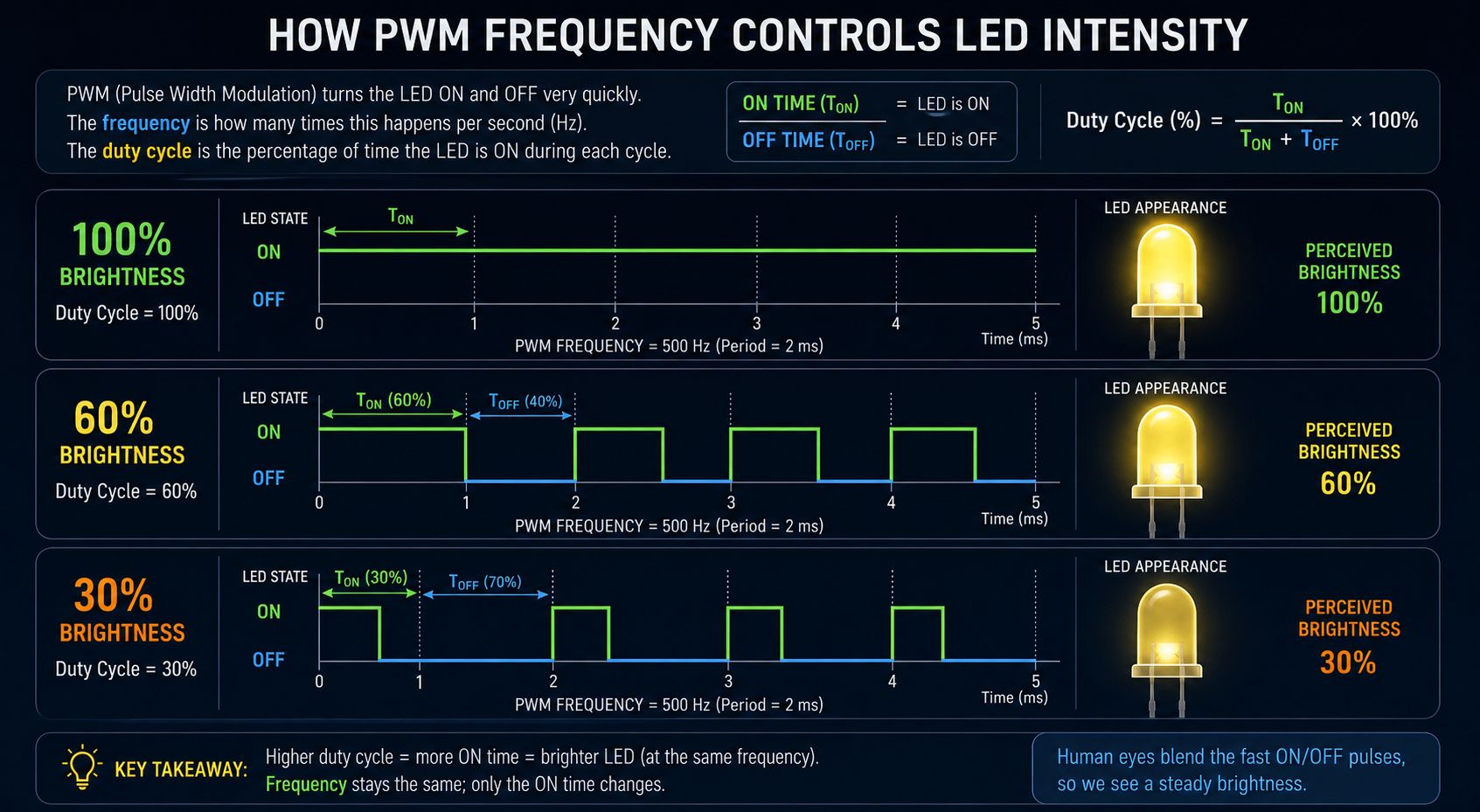
Lowering brightness by reducing voltage sounds logical, but it doesn’t work well in practice — LEDs change color temperature and behave inconsistently at lower voltages. Instead, every modern digital LED strip IC uses Pulse Width Modulation to dim. The chip rapidly switches the LED fully on and fully off, many times per second. Your eye and brain average these pulses together and perceive a steady, dimmer light.
At 50% brightness, the LED is on for 50% of each cycle and off for the other 50%. At 10% brightness, it’s on for just 10% of each cycle. This is called the duty cycle. At high enough frequencies, the switching is completely invisible — to the human eye, anyway. The problem is that cameras don’t work the same way eyes do.
Why Do Cameras See Flicker That Your Eye Doesn’t? #
A camera captures frames at a fixed rate — 24, 30, 50, or 60 FPS, depending on the shoot. The shutter opens and closes at precise intervals. If the LED’s PWM cycle happens to be out of sync with those intervals, the camera’s sensor catches the LED in its “off” phase during some exposures and “on” during others. The result is visible banding or strobing in the footage — even though the light looked perfectly steady to everyone on set.
This isn’t a camera malfunction. It’s physics. The human visual system integrates light over roughly 1/25th of a second, which smooths out fast flickers. A camera shutter opens for a fraction of that and captures whatever state the LED is in at that exact moment.
The general rule of thumb is that an LED’s PWM frequency needs to be at least 30 times the camera’s frame rate to guarantee flicker-free capture. For a camera shooting at 60 FPS, that means you need an LED with a PWM rate of at least 1800Hz. Slow-motion cameras shooting at 240 or 480 FPS need 7200Hz or higher — and that’s where most “professional” pixel strips quietly fail.
Which Common LED ICs Are Safe for Camera Work? #
The PWM rates across common addressable LED strip ICs vary enormously, and the difference between budget and professional hardware is stark here.
WS2812B — the most popular 5V LED pixel strip IC in the maker community — runs at around 400Hz. That’s fine for home decorations, hobbyist projects, and anything that isn’t being filmed. For TV studio LED lighting or any camera work, it’s a problem. At 400Hz, even at modest frame rates, you will see flicker in footage.
WS2815 at 12V runs similarly low PWM rates in standard configurations. The 12V architecture and backup data line make it excellent for permanent installations, but camera work requires additional consideration of the specific batch and manufacturer.
SK6812 — including the popular SK6812 RGBW strip — typically operates around 1100Hz. Better than WS2812B, but still marginal for high-frame-rate or slow-motion capture.
APA102 is different by design. It uses a separate clock line rather than a timing-based single-wire protocol, which gives manufacturers more control over PWM behavior. High-quality APA102 LED strip implementations can reach 19kHz+ PWM rates, making them genuinely camera-safe. This is why APA102 became popular in broadcast and film applications.
SK9822 runs at approximately 4700Hz out of the box, and MBI6020 reaches around 9766Hz. Both are strong choices for LED lighting for TV shows and film sets where cameras operate at various frame rates including slow motion.
Where Do You Actually Encounter Low-PWM Flicker in Real Life? #
Low-PWM flicker isn’t only a pixel LED strip problem. Once you know what to look for, you’ll spot it constantly — and understanding where it comes from helps you avoid the wrong hardware choices.
Cheap LED bulbs and household lamps are one of the most common offenders. Budget LED drivers inside cheap bulbs often use very low PWM frequencies — sometimes as low as 100Hz or even 50Hz tied directly to mains frequency. In normal viewing this looks fine. On a smartphone slow-motion video at 240 FPS, it looks like a strobe light.
Cheap DMX dimmers and LED controllers are another major source. A low-cost DMX LED controller or PWM dimmer module might advertise “DMX LED dimming” but run its output at 500Hz or lower. In a nightclub or bar this is usually invisible. In a venue with cameras — a bar LED installation that gets used for music video shoots, a club that hosts live-streamed DJ sets — it will show up on camera and look terrible.
Car headlights and taillights — especially on modern vehicles with LED arrays — are controlled by PWM for dimming. In normal viewing speed, they look like solid lights. Shoot a car on a dark road with a slow-motion camera and the taillights often pulse visibly. Automotive manufacturers are getting better at this, but it’s still common, especially in lower-end vehicles.
LED advertising screens and scoreboards in sports stadiums are another famous example. Shoot a soccer match or any night game in slow motion and the large LED video wall or perimeter boards often produce visible rolling bands across the frame. Broadcasters deal with this by adjusting their shutter angles and frame rates, but it’s an ongoing challenge — especially as more outdoor LED pixel installations appear in sports venues.
LED screens behind film subjects — car interiors, cockpits, studio backgrounds — have the same problem. Modern film productions use “in-camera VFX” with large LED pixel wall installations as virtual backgrounds. Getting these right for slow-motion or high-speed cameras requires specifying panels with PWM rates well above 3000Hz, which significantly limits which suppliers you can work with.
What Should You Specify for Professional Camera Installations? #
For any professional LED installation where cameras are present — whether it’s a permanent TV studio LED lighting setup, a concert stage LED lighting rig with video capture, or an event where footage matters — start by specifying the IC’s PWM rate in your technical requirements rather than treating it as an afterthought.
For standard broadcast at 24–60 FPS, you want a minimum of 2000Hz PWM. APA102, SK9822, and MBI6020 strips all meet this comfortably. For slow-motion capture at 120–240 FPS, aim for 5000Hz or higher. For extreme slow motion at 480+ FPS, you’re looking at specialist hardware — MBI6020 class chips, or dedicated professional dimmers with configurable high-frequency modes.
For analog LED strips controlled through a DMX LED controller or PWM dimmer, choose a decoder or dimmer that explicitly states its PWM output frequency. Professional units like the Lady Dimmer offer selectable frequencies up to 3.9kHz specifically for camera compatibility. Budget DMX dimmers usually don’t even list their PWM frequency — which tells you what you need to know.
Professional pixel LED controllers from LED Strip Studio — the LEC3, the REACTIVO — deliver high refresh rates to the strips, but the PWM rate remains determined by the IC chip in the strip itself. Choose the right strip IC for the environment, and the controller handles everything else correctly.
Quick Reference: PWM Rates by IC #
| IC | PWM Rate | Camera Safe? |
|---|---|---|
| WS2812B | ~400 Hz | No |
| WS2815 | ~1000 Hz | Marginal |
| SK6812 / SK6812 RGBW | ~1100 Hz | Marginal |
| WS2811 | ~400 Hz | No |
| APA102 | up to 19,000 Hz | Yes |
| SK9822 | ~4,700 Hz | Yes |
| MBI6020 | ~9,766 Hz | Yes |
Why do my LED strips flicker on camera but look fine to the eye?
The human eye averages light over about 40 milliseconds and can’t perceive rapid on/off switching above roughly 60Hz. A camera shutter opens and closes at precise intervals — 1/60th, 1/120th, or even 1/1000th of a second depending on frame rate and shutter angle. If the LED’s PWM cycle doesn’t align with those intervals, the camera catches the LED in its “off” state during some frames. This produces banding or strobing in footage that nobody on set could see with their eyes. The fix is choosing LED strips with a PWM rate high enough to be invisible at the camera’s frame rate — generally 30× the frame rate as a minimum.
What is the minimum PWM rate for LED strips used in TV studios?
For standard broadcast cameras shooting at 24–60 FPS, a minimum PWM rate of around 2000Hz gives you safe headroom. For slow-motion capture at 120–240 FPS, you want 5000Hz or higher. APA102, SK9822, and MBI6020 IC strips all meet these thresholds comfortably. WS2812B at 400Hz and WS2815 at around 1000Hz are not safe for professional camera environments and will produce visible flicker in footage, especially at higher frame rates or under shutter angle adjustments.
What is the difference between PWM rate and LED refresh rate?
Refresh rate is how many times per second your pixel LED controller sends a new frame of color data to the strips — measured in FPS. A high refresh rate (e.g., 500 FPS from an LEC3 controller) means smooth, responsive animations. PWM rate is something entirely different: it’s a fixed frequency inside the IC chip that controls how the LED dims by rapidly switching on and off. You can’t change PWM rate through software — it’s hardware. Both matter, but for camera flicker, PWM rate is the critical number to check when choosing your strips.
Why do LED car lights and scoreboards flicker in slow-motion video?
Automotive LED taillights, headlights, and large LED scoreboards or advertising screens are all controlled by PWM dimming. In real-time video they look solid. In slow motion at 240FPS or higher, the camera’s short shutter time captures individual PWM cycles, making the “off” periods visible as flicker or rolling bands across the frame. This is especially noticeable in night sports broadcasts and automotive commercials shot at high speed. It’s a fundamental consequence of PWM dimming at frequencies below the camera’s effective perception threshold, and it’s why broadcast production increasingly specifies minimum PWM frequencies for any LED hardware that will appear on camera.
Is APA102 better than WS2812B for camera work?
Yes, significantly. WS2812B uses a single-wire timed protocol with a PWM rate around 400Hz — well below safe thresholds for most camera work. APA102 uses a two-wire clock and data design that gives manufacturers much more control over PWM behavior, with rates reaching 19kHz or higher in quality implementations. This makes APA102 one of the standard choices for film and broadcast LED applications. The tradeoff is cost — APA102 strips are more expensive than WS2812B — and the controller must support the APA102 protocol, which all professional pixel LED controllers including the LEC3 and REACTIVO do.
Can I fix LED flicker on camera by changing my controller or software settings?
No — PWM rate is fixed in the IC chip and cannot be changed by the controller or software. What you can adjust is the camera’s shutter angle and frame rate to find a combination that minimizes visible banding, but this is a workaround, not a fix, and it constrains your creative options. The correct solution is to choose a strip with an IC whose PWM rate is high enough for your camera requirements before the installation is built. Once the strips are installed, the only real fix is to replace them with a higher-PWM alternative — which is exactly why specifying the right IC upfront matters so much in professional LED installation work.