
In the professional lighting ecosystem, SPI (Serial Peripheral Interface) is the essential “language” that allows a controller to talk to individually addressable LED pixels. While standard analog LEDs rely on simple power dimming, digital (pixel) LEDs use this synchronous serial communication protocol to receive complex instructions.
The Universal Translator: Separating Controllers from Lights #
The most significant advantage of the SPI protocol is the interoperability it creates between different manufacturers. Because these protocols are tied to the specific Integrated Circuit (IC) chip on the LED strip rather than a proprietary brand, you can separate your choice of controller from your choice of lights.
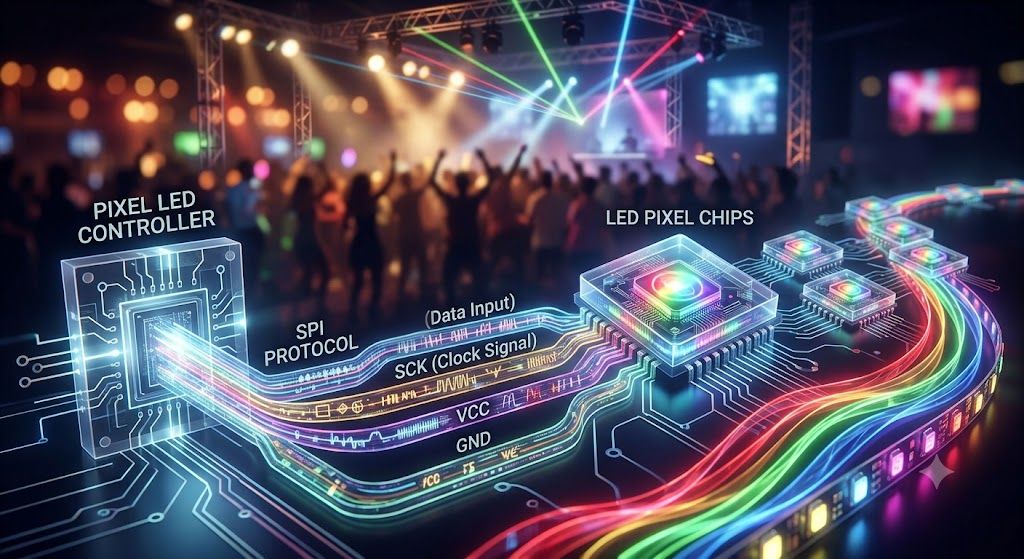
A controller produced by one company (like LED Strip Studio, Advatek, ENTTEC, or Madrix) can drive LED strips produced by another, provided they both “speak” the same SPI protocol. This allows professionals to select the best hardware for their specific needs—such as choosing a controller with advanced wireless capabilities or high-density outputs—while using any compatible LED fixture available on the market.
You could say that the SPI protocol is the communication language used between the SPI LED controller and the pixel LED chip (IC).
Important SPI Protocol Families #
There is no single industry-wide standard for SPI; instead, there are several common “families” of chips, each with its own characteristics:
- WS Family (WorldSemi): Perhaps the most famous, including the WS2811, WS2812B, and WS2815. These are typically asynchronous (data-only) protocols, popular for their simple wiring and affordability.
- APA Family: Known as “Superleds,” this family includes the high-speed APA102 and APA104. Unlike data-only types, these are clocked protocols, meaning they use a separate wire to synchronize timing, which allows for much faster refresh rates and more stable performance in complex animations.
- TM Family (Titan Micro): Common commercial protocols like TM1803, TM1809, and TM1814. These chips often offer high voltage variants (up to 24V or 32V), making them ideal for long cable runs without significant signal loss.
What Data Does an SPI Signal Contain? #
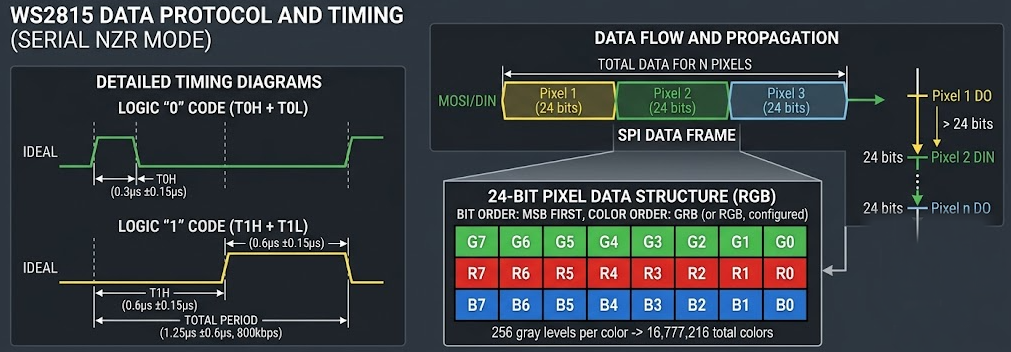
An SPI data packet is structured to provide the “brain chip” on each LED with everything it needs to know to render a specific color.
- RGB and RGBW: Most protocols transmit 24 bits of data for RGB pixels (8 bits each for Red, Green, and Blue) or 32 bits for RGBW pixels, which include a fourth channel for a dedicated White LED.
- Global Brightness Control: High-end clocked protocols like APA102 include an additional 5 bits of data specifically for global current control. This allows users to lower the overall brightness of the LEDs without sacrificing the 8-bit color resolution, ensuring smoother dimming at low intensities.
- 16-Bit Precision: Advanced chips like the MY9231 or WS2816 can process 16 bits of data per color, offering 65,536 steps of dimming for exceptionally smooth gradients required in TV studios and theatrical productions.
DMX vs. SPI: The 170-Pixel Barrier #
While professionals often use the DMX512 protocol to send commands from a lighting console, DMX has a physical limitation that SPI solves. A single DMX Universe consists of 512 channels. Since one RGB pixel requires 3 channels, one universe can only control 170 RGB pixels (512/3=170) or 128 RGBW pixels (512/4=128).
By converting DMX or Art-Net into SPI signals, modern controllers can bypass this limit, driving thousands of individual pixels from a single output while maintaining fluid, high-frame-rate animations.
What is Clock Signal for SPI Protocol? #
A clock signal in the SPI protocol is a dedicated timing feed used by “clocked” or “synchronous” pixel types—such as APA102, SK9822, or WS2801—to tell each individual LED exactly when to sample or “check” for incoming information on the data line. While “data-only” protocols embed timing within a single wire, a clocked system uses this separate wire to achieve significantly higher bandwidth and faster data speeds (up to six times faster), which translates to the extreme refresh rates required for fluid video content.
Most modern SPI pixel LED chips no longer use a dedicated clock signal. It saves an extra wire, and in practice, the clock line offers little benefit in terms of signal quality.
Can I use any SPI LED controller with any brand of LED strip?
Generally yes, as long as the controller supports the specific IC type on your strip. SPI is tied to the chip, not the brand of strip — so a LED Strip Studio LEC3 can drive strips from any manufacturer as long as the IC (WS2812B, SK6812, APA102, etc.) is in the supported list. Always check the controller’s compatibility list before buying and confirm the IC type is printed on your strip’s datasheet.
Why do my LEDs show the wrong colors even though everything is connected?
Almost certainly a color order mismatch. Different IC chips send the red, green, and blue bytes in different sequences — WS2812B uses GRB (green first, then red, then blue) rather than the RGB you might expect. If your controller is set to RGB but your strip is GRB, what you call “red” will light up green. Fix it by changing the color order setting in the controller’s web interface — no rewiring needed.
How far can an SPI signal travel before it starts causing problems?
Without any signal conditioning, a standard 5V SPI signal starts getting unreliable after about 5–10 meters. Noise in the cable corrupts the data and you’ll see random color glitches or pixels freezing. To go further, you use a differential SPI extender — devices like the LED Strip Studio SPILAMP or Symmetrizer convert the signal to a noise-resistant differential format and can push it reliably over 300 meters of standard Cat5e cable.
What's the difference between a "clocked" and "non-clocked" SPI protocol?
Non-clocked (data-only) protocols like WS2812B use a single wire and embed timing in the signal itself using precise pulse widths. Clocked protocols like APA102 use two wires — one for data and one for a clock signal that tells each LED exactly when to sample the data line. Clocked protocols are faster and more reliable over longer distances, but need an extra wire in the installation. Most modern installations use non-clocked chips since they’re simpler and fast enough for most applications.
Does the SPI protocol work wirelessly, or does it always need a physical cable?
SPI itself always needs a physical cable — it’s a short-range serial bus not designed for wireless transmission. However, the higher-level control protocols (Art-Net, sACN) that feed data to your SPI controller can travel over Wi-Fi if needed. The controller then converts that network data to SPI locally at the LED strip. Products like the Reactivo 2 use Wi-Fi for the network connection to the controller, then SPI from the controller to the strip.