
An addressable LED strip, also known as a digital, smart, or pixel LED strip, is a flexible circuit board populated with LEDs that can be controlled individually. Unlike traditional “dumb” analog strips where the entire length of the strip must be the same color and brightness at any given time, pixel LEDs allow every single diode in the chain to perform a unique action independently.
A Better Name: Pixel LED Strips #
While “addressable” is the most common industry term, it is technically not a very accurate description of how the technology works. In a truly addressable system, you would manually set a unique ID or address for every chip on the line.
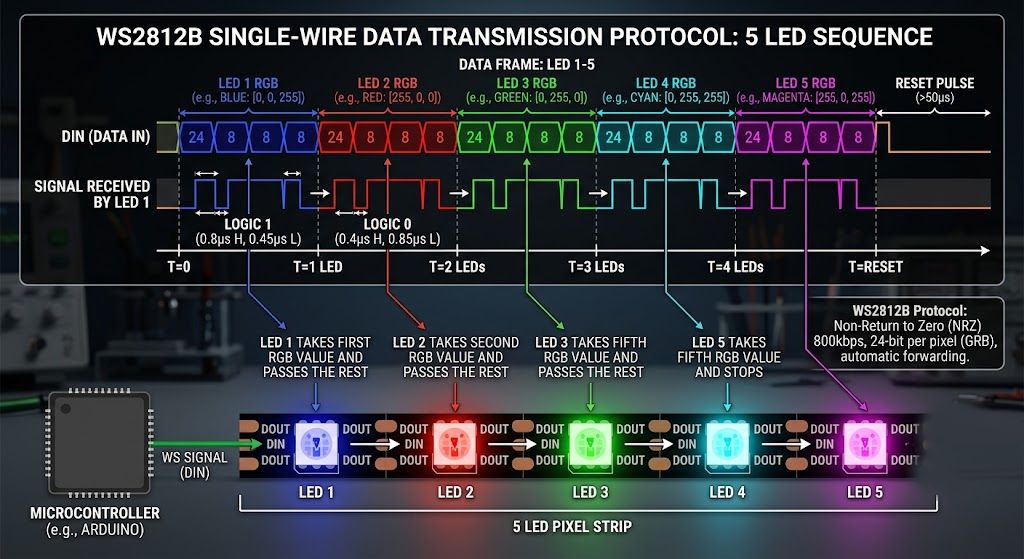
The reality of these strips is a cascading data process. It is more accurate to call them pixel LEDs because the system treats each LED as an individual point of data, similar to a pixel on a computer screen. When a controller sends a stream of information, the first LED takes the first set of RGB data meant for it, uses it to set its color, and then sends the rest of the data packet to the next LED in the line. This “daisy-chain” mechanism repeats down the entire strip, which is why the data must flow in one specific direction.
Controlled via SPI Protocol #
The language these strips use to communicate is the SPI (Serial Peripheral Interface) protocol. Unlike analog strips that are controlled by simple power dimming, pixel strips utilize synchronous serial communication to receive complex instructions.
Each LED (or group of LEDs) has a small Integrated Circuit (IC) “brain chip” that listens to this SPI data feed. Because there is no single industry standard for this protocol, it is defined by the specific type of chip used on your strip. Common “families” of SPI protocols include:
- WS Family: Popular for both DIY and pro projects (e.g., WS2811, WS2812B, and the 12V WS2815 with a backup data line).
- APA Family: High-speed “clocked” protocols like APA102 and APA104 that use an extra wire for timing to achieve faster refresh rates.
- TM Family: Frequently used in commercial and architectural lighting (e.g., TM1803, TM1809, and the RGBW TM1814).
Professional Control Solutions #
To drive these strips, you need a specialized SPI LED controller that can translate lighting software data into the SPI “language” the strips understand. Professional-grade examples include:
- LEC3 (LED Ethernet Controller 3): An advanced red-box controller capable of handling up to 4,096 individual RGB pixels. It is widely used in TV studios and for permanent building facades.
- SPI Matrix: A black-box Art-Net to SPI decoder designed for professionals who want to use 3rd party software like Madrix, Resolume, or MadMapper.
While some users attempt to control these pixels using the DMX512 protocol, DMX is highly limited for this purpose. A single DMX universe can only control up to 170 RGB pixels (512 channels ÷ 3 channels per pixel), making it impractical and “crazy” for large installations that often feature thousands of LEDs.
Different Types of Colors and Densities #
Pixel LED strips are available in several configurations to meet different creative and technical requirements:
Color Variations:
- Single-Color: Often used for creative white-only installations.
- Dual-Color: Often used for CCT (Correlated Color Temperature) applications, such as combining cold and warm white, or for pixel-mapped Edison bulbs that create a retro look with digital control.
- RGB: The standard choice for colorful animations and video walls using 3-in-1 LED chips.
- RGBW: Includes a fourth dedicated white channel (4-in-1 chip) to provide purer white tones and higher-quality white light for architectural environments.
Pixel Density: The density of pixels determines the resolution and smoothness of the light. While many varieties exist, manufacturers typically offer 30 or 60 LEDs per meter. A 60 LED/m strip is the standard for high-resolution effects, while 30 LED/m strips are often chosen to cover larger areas with fewer control universes and lower power requirements.
Where the pixel LED strips are used? #
Pixel LED strips serve as a versatile foundation for high-impact professional lighting across several major sectors. In nightclub and lounge installations, they are frequently used to create immersive 3D environments, such as music-reactive LED ceilings and intricate wall patterns that provide a “WOW factor” for guests. Within TV and broadcast studios, these strips function as decorative set elements and large-scale horizons, often hidden behind diffusers to ensure high-contrast, flicker-free visuals that look perfect on camera.
For architectural and facade lighting, pixels transform building exteriors into dynamic media surfaces, allowing landmarks to display generative art, branded video content, or scrolling text across thousands of individual points of light. Whether creating a “breathtaking” building wrap or a “mesmerizing” club scene, pixel LEDs provide the micro-level control needed for macro-level creative impact.
What makes an LED strip "addressable" — can't you just dim regular LEDs?
Regular LED strips respond to power — when you dim them, the whole strip dims together. Addressable strips have a tiny IC chip at each LED (or group of LEDs) that reads a data signal and independently controls just that pixel. So instead of “dim everything to 50%,” you can say “pixel 1 is red, pixel 2 is green, pixel 3 is off” — giving you per-pixel control for animations and video-like effects.
Do all addressable LED strips use the same data protocol?
No, and this is one of the trickier parts. Each IC chip family (WS, APA, TM, SK) has its own timing and data format. Your controller has to be set to match the specific IC on your strip — if they don’t match, you’ll get scrambled colors or nothing at all. The good news is that all major professional controllers including the LED Strip Studio LEC3 support 15+ IC types and let you pick the right one from a dropdown in the browser interface.
How many addressable LEDs can I realistically run from one controller output?
A single SPI output can technically handle a long chain of pixels, but in practice you want to keep it around 1,024 pixels per output for reliable signal quality. The LEC3 has 4 independent outputs, giving it a practical total of 4,096 pixels. For larger setups, you add more controllers — each connected to the same Ethernet network, each managing its own pixel groups.
What's the difference between 30 LEDs per meter and 60 LEDs per meter strips?
Higher density means smoother animations and finer detail, but also more data channels, more power draw, and higher cost. At viewing distances over a few meters, 30 LED/m looks nearly as smooth as 60 LED/m and can cut your hardware costs by 30–50%. For close-up viewing like a TV studio set or a retail display, 60 LED/m or higher is worth it. For large architectural facades viewed from across a street, 30 LED/m is usually plenty.
Are addressable LED strips safe for permanent installation?
Yes, when installed properly by someone who understands DC electrical systems. Use the right voltage, correctly rated power supplies and cables, and protect connections from moisture if there’s any chance of water exposure. WS2815 at 12V is a popular choice for permanent installs specifically because it’s more forgiving of voltage drop over long runs and has a backup data line so one dead pixel doesn’t kill the rest of the strip.