

Project Quick Facts
Why Olympic Broadcasts Push TV Studios to Their Limits #
The Olympics is one of the most-watched sporting events on the planet. Billions of people tune in. For every national broadcaster covering the games, that viewership brings enormous pressure — your studio has to look exceptional, because the whole world is watching.
In 2026, we got the call from Slovakia’s national TV to upgrade their broadcast studio for the Olympics season. The brief was ambitious, and the solution we built together is one of the most unique LED pixel installations we have ever delivered.
The Concept: A Stadium Full of Fans #
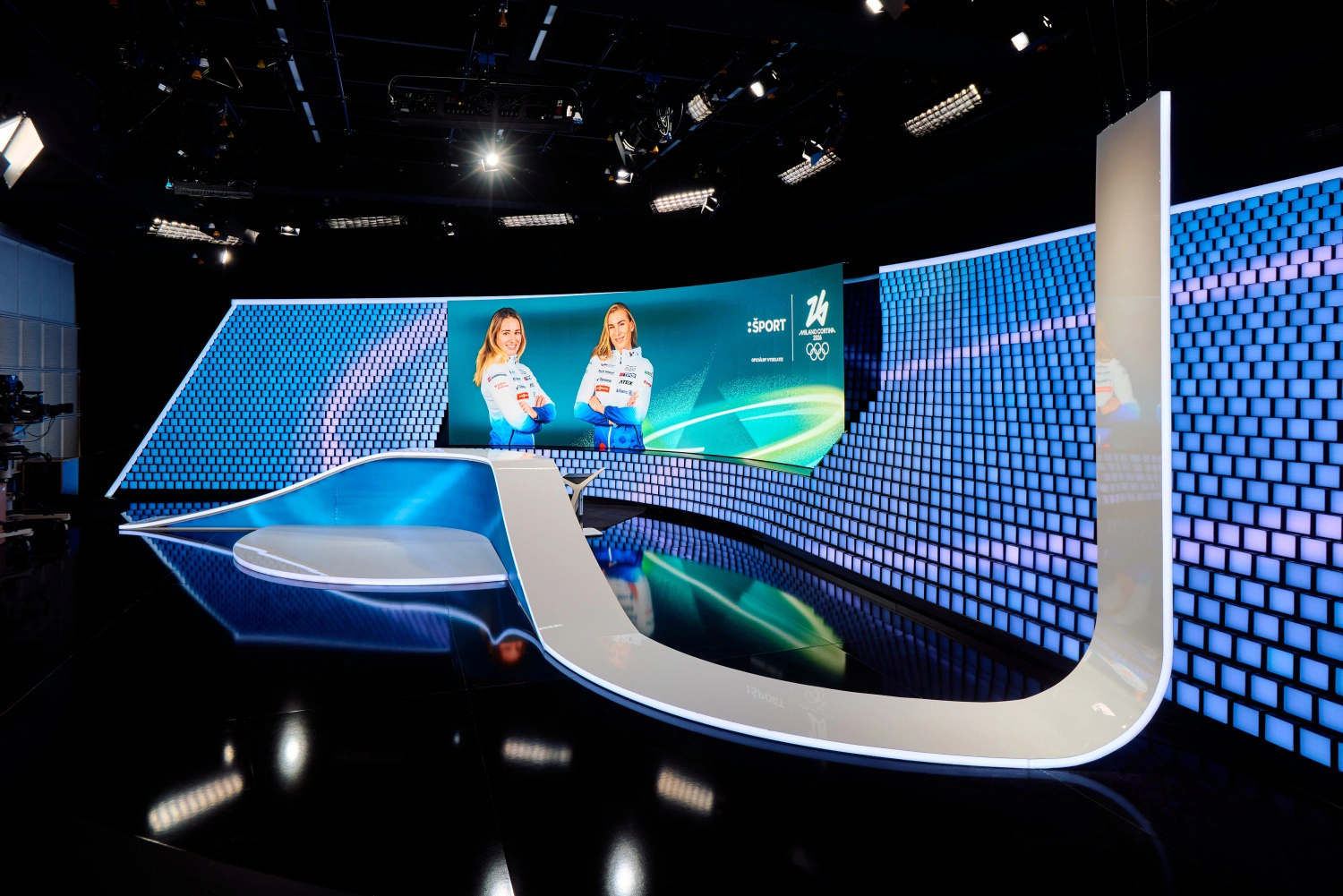
The architect’s vision was specific from day one. The studio background had to feel like a packed stadium — thousands of individual squares mimicking fans holding up banners and cards in the stands. Not a flat LED wall, not a screen, but something that carries depth, texture, and personality.
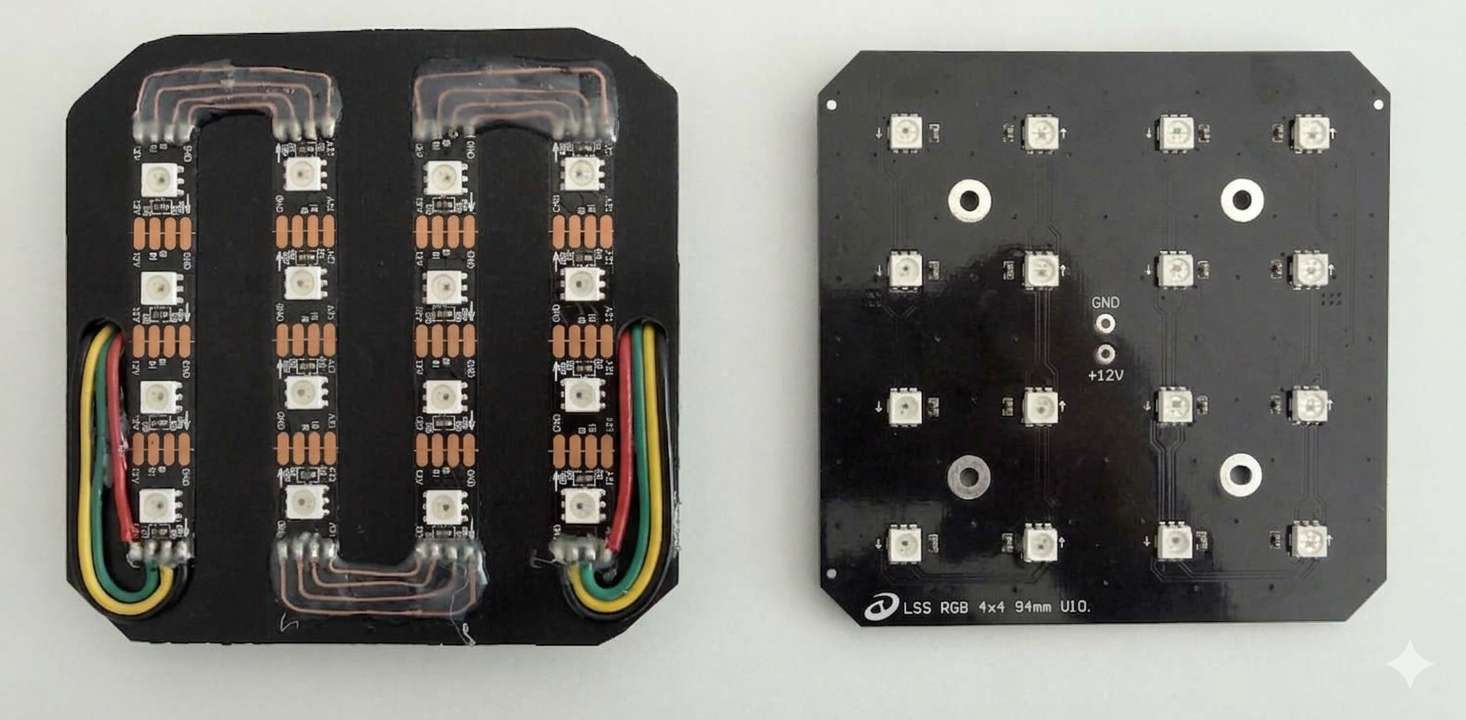
To bring that idea to life, the entire backdrop is built from nearly 3,500 individual squares, each measuring 10 × 10 cm. But here’s what makes this installation genuinely different: every single square is an active WS2815 LED pixel tile with a resolution of 4 × 4 addressable pixels. Each tile is fully independent. Each pixel within each tile is individually controllable.
That adds up to almost 56,000 individual RGB pixels packed into a 40 m² active display surface. The result is a background that is part architectural installation, part LED pixel wall, and entirely unlike any other TV studio backdrop we have seen.
The Manufacturing Problem We Had to Solve #
When the client first described the concept, their initial plan was to cut a standard digital LED strip into 10 cm segments and hand-solder each segment into a protective square housing. It sounds reasonable — until you run the numbers.
We estimated that approach would take well over 4,000 hours of manual labor. That is simply not a budget any client can justify for a single installation, no matter how important the project is.
So we went back to the drawing board. Instead of adapting off-the-shelf products, we designed a custom LED square tile specifically for this installation. The tile uses WS2815 addressable RGB LED pixels arranged in a 4 × 4 matrix on a single PCB. It slots into a protective housing with a built-in diffuser, which makes it easy to handle during installation and keeps the light output clean and even on camera.
This is exactly why having engineering capability in-house matters in a professional LED installation. When the standard solution would cost ten times more in labor than the hardware, you design a better solution.
How 3,500 Tiles Get Installed and Wired #
With the custom WS2815 tiles ready, installation became a repeatable, scalable process. Each tile connects to the next via a short cable run, and the entire array feeds back into the LED pixel controller network.
The addressable LED strips inside each tile use the WS2815 protocol, which includes a backup data line — if a pixel in the chain loses signal, the backup line keeps the rest of the run alive. That kind of reliability matters in a live broadcast environment where you cannot stop the show to debug a wiring issue.
Power distribution across 56,000 pixels also required careful planning. With that many WS2815 LED strips drawing current simultaneously, voltage drop becomes a real concern. We designed the power injection points to ensure every tile receives consistent voltage regardless of its position in the array.

Pixel Mapping: Connecting Resolume to the LED Wall #
The control room team at Slovak national TV already works with Resolume as their video compositing and playback platform. Asking a broadcast team to learn an entirely new software tool mid-cycle — especially during an Olympic broadcast season — is unrealistic.
So we built a workflow that keeps Resolume exactly where it is.
The LED wall connects to the control room via an HDMI grabber (Blackmagic Intensity PRO). Resolume outputs its canvas to HDMI as it would for any display. The Intensity PRO card captures that HDMI signal and passes it into LED Strip Studio, which handles all the LED pixel mapping software duties — translating the incoming video data into per-pixel SPI commands sent out to the WS2815 tile array.
The latency between Resolume and the live LED wall is minimal and fully acceptable for broadcast use. The team can push any content — animated graphics, color washes, match visuals, country flags — directly from their existing Resolume workflow to the 56,000-pixel backdrop, with no extra rendering step and no specialist LED programmer required on set.
This is the same approach we recommend to any client using a media server or compositing software they already know well. LED Strip Studio functions as the translation layer between video output and addressable LED controller hardware, without forcing a workflow change on the production side.
The Result #
Walking into the studio, the visual impact is immediate. The 3,500 tile grid has a texture and geometry that a flat LED pixel wall simply cannot replicate. Individual squares catch light differently depending on the content playing — some tiles brilliant, some subdued — creating the layered crowd effect the architect originally imagined.
For the broadcast team, the system is transparent. They push content from Resolume. The LED wall responds. There is no extra step, no extra team member, no extra complexity.
Going with a custom-engineered tile instead of a cut-and-solder approach saved thousands of hours and delivered a cleaner, more reliable result. That is the core argument for partnering with a pixel LED installation company that can design around a problem rather than just around a product catalog.
As a backdrop for Olympic coverage on national television, this studio now stands out. And when billions of people are watching, standing out is the entire point.
Download workspace for LSS3 software
Frequently Asked Questions #
How to plan a pixel LED installation for a TV studio?
Start with the visual concept and work backwards to the hardware. Define the total pixel count, the surface area, and how the production team will feed content to the display. For large custom surfaces like this installation, designing purpose-built tile hardware is often more efficient than adapting off-the-shelf LED strips. Always match the control workflow to software the production team already uses — forcing a new tool on a live broadcast operation creates unnecessary risk.
What LED software works with Resolume Arena for pixel LED control?
LED Strip Studio integrates with Resolume via an HDMI grabber such as the Blackmagic Intensity PRO. Resolume outputs its canvas over HDMI as it would to any display. LED Strip Studio captures that signal and uses its LED pixel mapping software engine to convert it into per-pixel SPI commands for the addressable LED hardware. Latency is minimal, and the production team does not need to leave the Resolume environment they already know.
How to stream HDMI video to pixel LEDs?
You need a video capture card (such as Blackmagic Intensity PRO) and LED pixel mapping software that supports HDMI input as a video source. The capture card converts the HDMI signal to a data stream the software can read. The software then maps each pixel from that video frame to a specific LED in your physical layout, outputting the result over a network or SPI connection to the LED pixel controller. LED Strip Studio supports this workflow natively.
What is the difference between digital and analog LED strips?
An analog LED strip has a single color per channel across the entire strip — every LED shows the same color at once. A digital addressable LED strip (such as WS2815) has an IC chip at each LED position, allowing every pixel to be controlled independently. For any installation where individual pixel control matters — pixel walls, animations, video playback — digital addressable strips are the only option. Analog strips are simpler and cheaper but have no role in a pixel-mapped TV studio application.
How to build a pixel LED video wall from scratch?
Define the resolution and physical dimensions first. Then choose your LED pixel type — WS2815 is a good choice for robustness thanks to its backup data line. Design or source a tile or panel format that makes installation repeatable. Calculate power injection points to avoid voltage drop. Choose a pixel LED controller and LED pixel mapping software that can handle your total pixel count and accept content from your preferred media source. For very large custom shapes, designing bespoke hardware (as we did here) is often faster and cheaper than adapting standard products.
How much does a professional LED pixel installation cost?
It depends heavily on pixel count, custom hardware requirements, control system complexity, and labor. The most expensive variable is often labor — not the LED hardware itself. In this project, the original plan of hand-soldering 10 cm strip segments into 3,500 housings would have cost over 4,000 hours of work. Designing a custom WS2815 tile reduced that dramatically. Always get a full engineering assessment before committing to a fabrication approach, because the method of construction can swing the total budget by a factor of ten.